Have you ever wished you could know the moment your brand, website, or competitor is mentioned online—without constantly searching Google yourself? For marketers, business owners, and SEO beginners, missing these signals often means lost opportunities: unclaimed backlinks, unmanaged brand reputation issues, or competitors launching campaigns without you noticing.
This is exactly where Google Alerts comes in. It’s a free but often underestimated tool that can quietly work in the background, sending you valuable insights straight to your inbox. In this guide, we’ll break down what Google Alerts really is, how it works, and why it still matters today—before moving into step-by-step setup and real-world use cases later in the article.
What Is Google Alerts?
Simple Definition (Beginner-Friendly)
Google Alerts is a free monitoring service from Google that notifies you whenever new content matching your chosen keywords appears on the web.
In simple terms:
- You tell Google what you want to track (a brand name, website, person, or topic).
- Google scans newly indexed content across the web.
- You receive an email alert when a relevant mention is found.
For example, if you create an alert for your brand name, Google Alerts can notify you when:
- Someone writes a blog post mentioning your business
- A news site publishes an article about your industry
- A forum or website references your product or domain
This makes Google Alerts especially useful for SEO monitoring, brand reputation management, and competitor tracking.
How Google Alerts Works Behind the Scenes
Google Alerts relies on Google’s existing search infrastructure. When Google crawls and indexes new pages, it checks whether that content matches any alert queries you’ve set up.
Sources Google Alerts typically monitors include:
- News websites
- Blogs
- Web pages
- Some forums and discussion sites
However, it’s important to understand its limitation: Google Alerts only detects content that Google indexes. It does not reliably track private social media posts or closed communities.
According to Google’s own documentation, alerts are not guaranteed to catch everything and may be delayed depending on indexing speed. This transparency is one reason Google Alerts is best viewed as a supporting tool, not a complete monitoring solution.
Is Google Alerts Free?
Yes. Google Alerts is completely free to use.
All you need is:
- A Google account
- Keywords or phrases you want to monitor
There are no usage fees, subscription tiers, or hidden costs. This makes Google Alerts especially attractive for:
- SEO beginners
- Small businesses and SMEs
- Solo founders and freelancers
That said, “free” also means limitations. Compared to paid tools like Ahrefs or Brand24, Google Alerts offers less data depth, fewer filters, and no advanced analytics.
Why Google Alerts Is Still Useful in 2026
With so many advanced SEO and monitoring tools available today, it’s fair to ask: Is Google Alerts still worth using? The short answer is yes—if you understand what it does well and where it falls short.
Benefits for Marketers
Despite its simplicity, Google Alerts offers several practical advantages:
- Zero cost – ideal for budget-conscious teams
- Easy setup – no technical knowledge required
- Passive monitoring – insights come to you automatically
- Early detection – spot mentions before issues escalate
From hands-on experience working with small businesses, one common win is discovering unlinked brand mentions. These are perfect opportunities to reach out and request a backlink—an SEO tactic that often converts better than cold outreach.
Who Should Use Google Alerts?
Google Alerts is especially suitable for:
- Beginners learning SEO fundamentals
- Business owners managing their own marketing
- Content marketers researching trends
- PR teams tracking brand mentions
If you’re just starting out, Google Alerts acts like an early-warning radar—simple, lightweight, but effective.
When Google Alerts Is NOT Enough
Google Alerts is not designed for deep competitive intelligence or full backlink audits.
Its common limitations include:
- Missed mentions
- Delayed notifications
- No social media tracking (Facebook, Instagram, TikTok)
- No sentiment analysis or metrics
As SEO expert Brian Dean once noted, “Google Alerts is great for catching low-hanging fruit—but serious SEO work still requires dedicated tools.”
For advanced campaigns, it’s best used alongside tools like keyword trackers, backlink analyzers, and social listening platforms.
How to Set Up Google Alerts (Step-by-Step)
Setting up Google Alerts correctly is where most people go wrong. A poor setup leads to noisy, irrelevant alerts—or worse, missing important mentions altogether.
Step 1: Access Google Alerts
Go to https://www.google.com/alerts and sign in with your Google account.
You’ll see a simple interface with a search box labeled “Create an alert about…”. This is where everything starts.
Step 2: Enter the Right Keywords
The quality of your alerts depends heavily on keyword selection.
Common keyword types include:
- Brand name (e.g. YourBrand)
- Website domain (e.g. yoursite.com)
- Competitor names
- Industry terms
Pro tip: Use quotation marks to track exact matches, especially for brand names. This reduces irrelevant results.
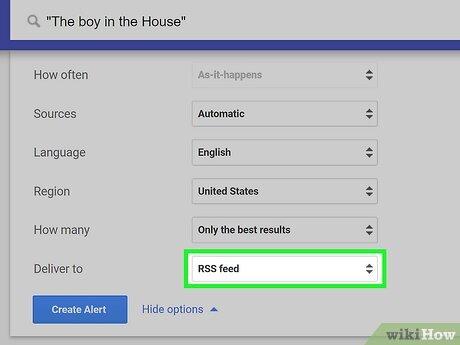
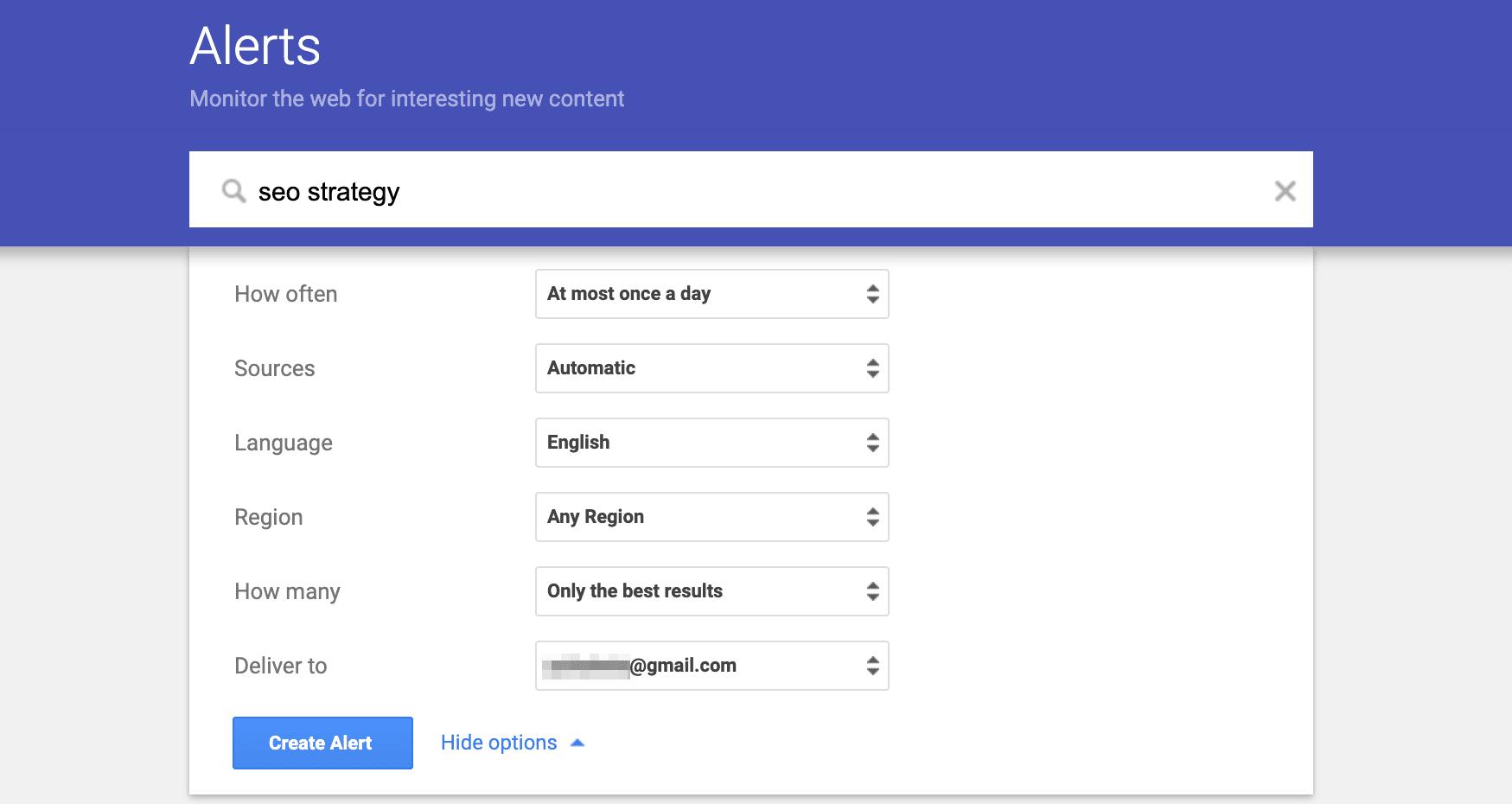
Step 3: Configure Alert Options (Very Important)
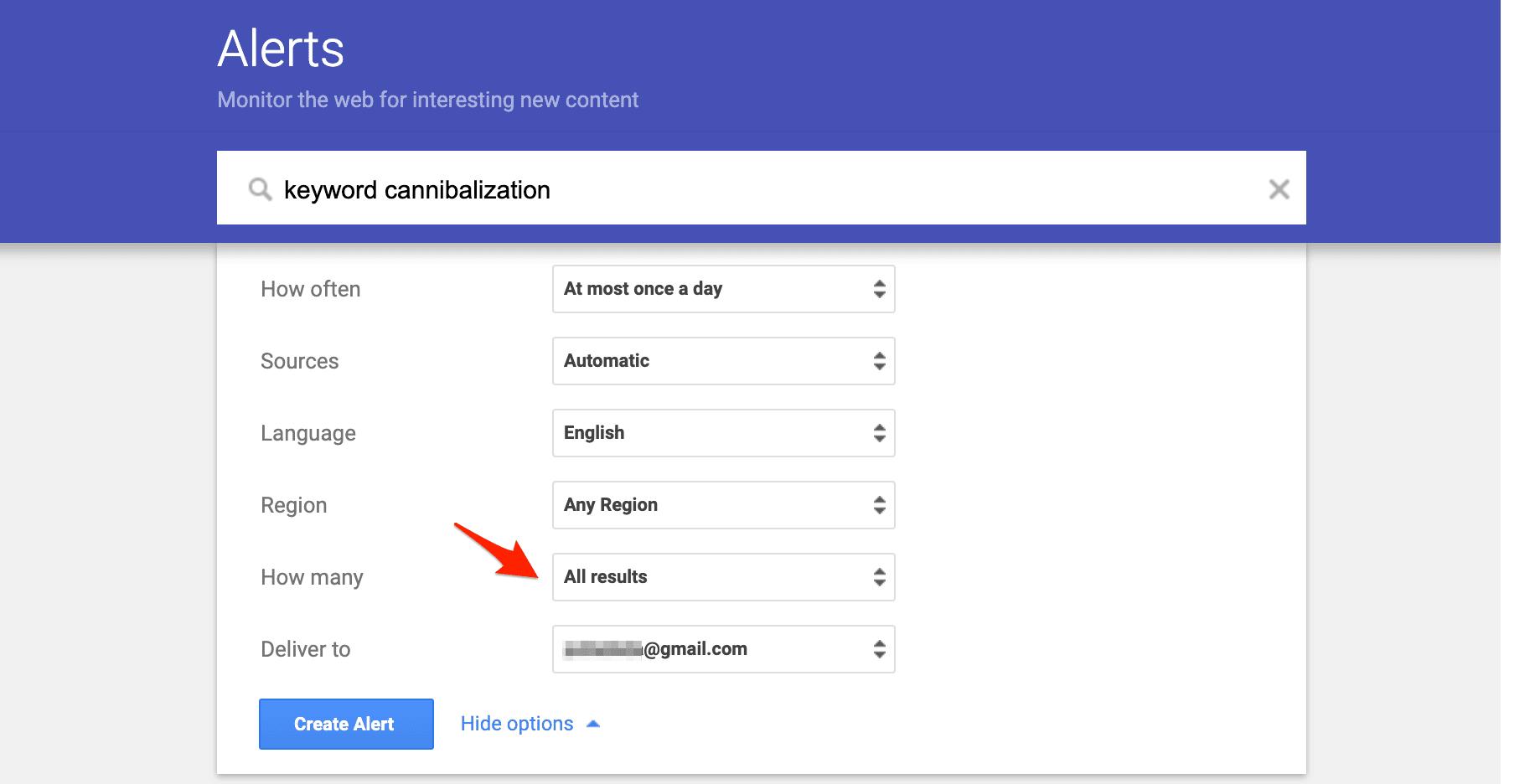
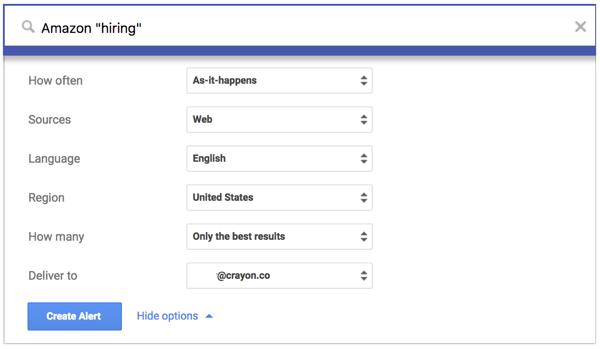
Click “Show options” to customize how Google Alerts behaves.
- How often: As-it-happens, once a day, or once a week
- Sources: Automatic, News, Blogs, Web, etc.
- Language & Region: Match your target market
- How many: Only the best results vs all results
- Deliver to: Email or RSS feed
For most SEO and brand monitoring use cases, “Once a day” + “Only the best results” is a good starting point.
Step 4: Manage & Edit Existing Alerts
You can edit, pause, or delete alerts anytime from the dashboard.
Best practice is to:
- Review alerts weekly
- Remove noisy keywords
- Add new alerts as campaigns evolve
Frequently Asked Questions (Early FAQ)
Is Google Alerts accurate?
Google Alerts is reasonably accurate for web and news mentions, but it does not capture everything. It should be treated as a helpful signal, not a complete data source.
How many Google Alerts can I create?
There is no officially published limit, but creating too many alerts may reduce usefulness and increase noise.
Can Google Alerts track social media?
No. Google Alerts does not reliably track private or closed social media platforms. It mainly monitors publicly indexed web pages.
Practical Google Alerts Use Cases (Most Important Part)
Understanding Google Alerts is useful—but knowing how to apply it in real situations is where the real value lies. Below are the most effective, proven use cases based on real marketing and SEO workflows.
Use Google Alerts for Brand Monitoring
Brand monitoring is the most common and easiest use case of Google Alerts.
You can track:
- Your brand name
- Product names
- Founder or spokesperson names
Why this matters:
- Catch negative mentions early before they spread
- Discover positive PR you can amplify
- Understand how people talk about your brand
Real-world example:
A small eCommerce brand noticed a blog post criticizing delivery delays. Because Google Alerts notified them early, they responded publicly, fixed the issue, and turned a negative situation into trust-building transparency.
Use Google Alerts for SEO
From an SEO perspective, Google Alerts shines in two main areas:
- Unlinked brand mentions
- Basic backlink discovery
When someone mentions your brand but doesn’t link to your site, Google Alerts helps you spot it. You can then politely reach out and request a link.
According to a study by Ahrefs, unlinked brand mentions are one of the easiest backlink opportunities because the author already knows you.
This tactic pairs extremely well with internal resources like:
Use Google Alerts for Competitor Monitoring
You can also create alerts for competitor names to monitor:
- New product launches
- PR campaigns
- Media coverage
This helps you answer questions like:
- What channels are they investing in?
- Which publications mention them?
- What messaging are they using?
Use Google Alerts for Content Ideas
Content marketers often struggle with topic discovery. Google Alerts can act as a lightweight trend radar.
Set alerts for:
- Industry keywords
- Emerging tools
- Competitor blog names
When new content appears, you’ll spot patterns—topics that keep showing up—which signals content demand.
Use Google Alerts for PR & Outreach
PR teams use Google Alerts to:
- Track journalist mentions
- Find outreach opportunities
- Monitor campaign coverage
As PR expert Gini Dietrich puts it: “Monitoring is the foundation of modern PR. If you don’t know what’s being said, you can’t respond strategically.”
Advanced Google Alerts Tips & Search Operators
Use Search Operators to Improve Accuracy
Google Alerts supports many Google search operators.
- “Exact phrase” – track exact brand names
- OR – combine multiple terms
- -keyword – exclude irrelevant terms
- site: – monitor specific domains
Example:
"Your Brand" -job -career removes job listings from alerts.
Keyword Combinations That Work Well
- Brand + review
- Brand + scam
- Competitor + launch
- Industry keyword + trend
How to Reduce Noise
Most “Google Alerts doesn’t work” complaints come from poor setup.
Fix noise by:
- Narrowing keywords
- Using quotes
- Choosing “Only the best results”
- Limiting regions and languages
Common Google Alerts Mistakes (And How to Fix Them)
- Too broad keywords: Use long-tail phrases
- Expecting real-time alerts: Alerts depend on indexing speed
- Using it as the only tool: Combine with SEO platforms
- Never reviewing alerts: Clean them monthly
Google Alerts vs Other Monitoring Tools
| Tool | Best For | Cost |
|---|---|---|
| Google Alerts | Basic monitoring | Free |
| Ahrefs Alerts | Backlinks & SEO | Paid |
| Brand24 | Brand sentiment | Paid |
Use Google Alerts as a starting point. Upgrade only when your needs grow.
Google Alerts Not Working? Common Issues & Fixes
Missing Alerts
Cause: Narrow keywords or low indexing speed.
Delayed Notifications
Cause: Google indexing lag.
Low-Quality Sources
Fix: Filter by language and region.
Email Delivery Problems
Fix: Check spam folder or switch to RSS.
Google Alerts Best Practices Checklist
- Set alerts with quotes
- Start with daily frequency
- Review alerts weekly
- Remove low-value keywords
- Combine with SEO tools
Frequently Asked Questions About Google Alerts
Is Google Alerts good for backlinks?
Yes, especially for finding unlinked brand mentions.
Can Google Alerts track competitors?
Yes, but only public web mentions.
Are there better alternatives?
Yes, paid tools offer deeper insights, but Google Alerts is still valuable for beginners.
Final Thoughts: Should You Use Google Alerts?
Google Alerts isn’t flashy—but it’s practical.
If you’re a beginner, small business owner, or solo marketer, it delivers real value with zero cost. Used correctly, it helps you:
- Protect your brand
- Improve SEO
- Monitor competitors
- Discover content ideas
The smartest approach is simple:
Start with Google Alerts, learn the signals, then scale with advanced tools when needed.
Author: DigitalMarketingCF Editorial Team – Practical SEO & Digital Marketing insights based on hands-on experience with SMEs and growing brands.